It's also a record that you and your client both keep. The builder on this page is a free invoice template: answer the steps on the left and the invoice fills in on the right, ready to download as a PDF or send as a live link.
What an invoice should include
An invoice should include a unique number, the issue date and the due date, your details and your client's, a line for each service with its price, any tax or discount, the total due and how to pay. Here's where each goes in the builder:
What an invoice includes, and where you add it in this builder | | What it says | In the builder |
| Invoice number | Unique, in one unbroken sequence, like INV-0042 | The You step, counted up for you |
| Dates | The day you send it, and the day it's due | The You and Payment steps |
| Your details | Your name or business, address and email, and any tax ID | The You step |
| Your client's details | Their name, company and billing address, and their tax ID if they ask | The Client step |
| Line items | One line per service, at a fixed price or by the hour, day or unit | The Items step |
| Tax and discount | On lines of their own, so the total explains itself | The Tax step |
| Total due | What your client pays | Added up for you |
| How to pay | Your bank details, or another way to pay | The Payment step |
| Note | A thank-you, a payment reference, a purchase order number or late fee terms | The Note step |
What an invoice must show depends on where you work. In the UK, GOV.UK's list also asks for the date of the work: if it isn't the invoice date, add it to the project or the note. In the US, the IRS counts invoices among the records that support your income.
A sample freelance invoice, filled in
Here's a freelance invoice filled in: Doe Design Studio invoicing Acme Corporation $5,300 for a brand identity refresh, due in 14 days.
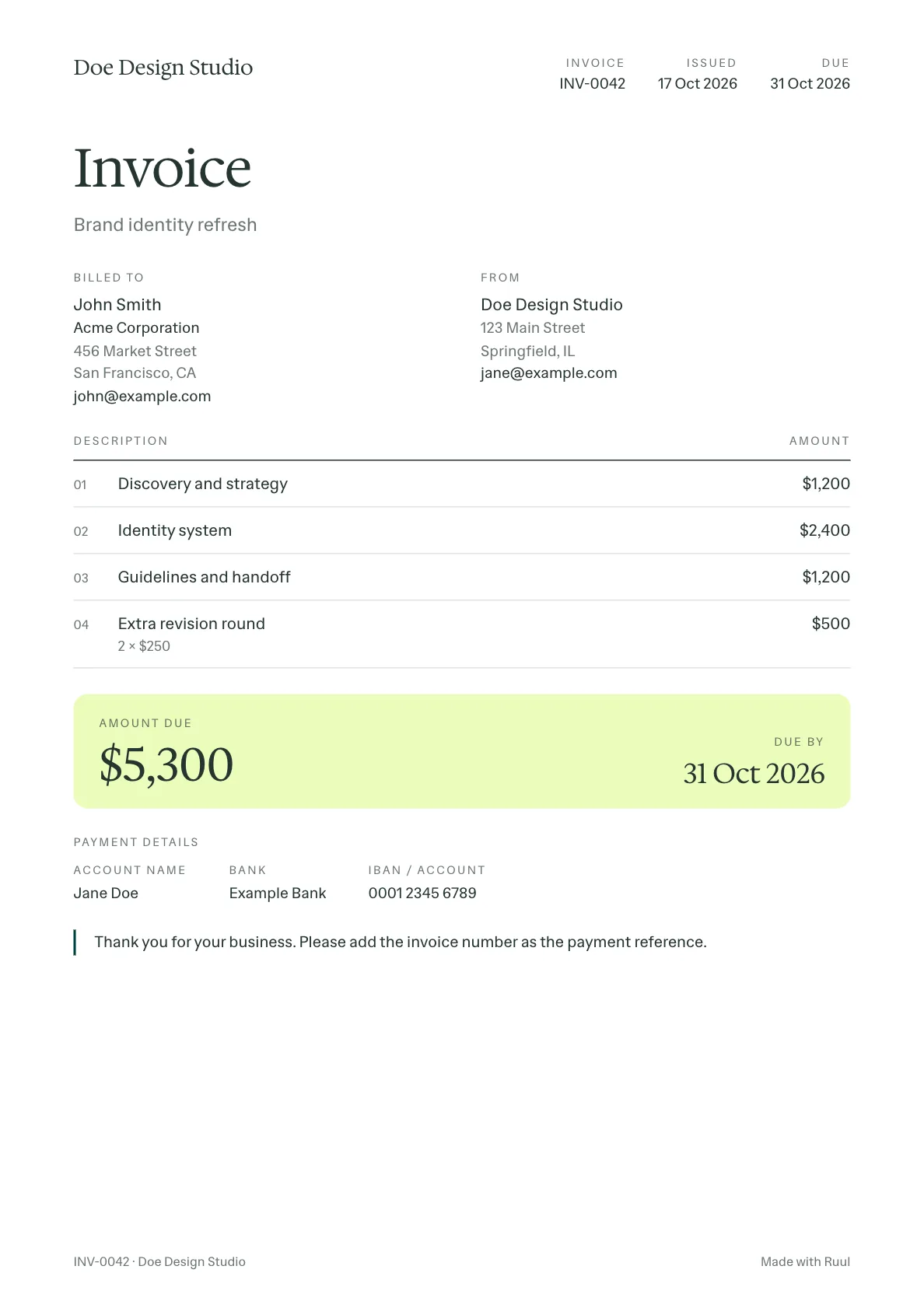 The sample invoice as your client sees it. The PDF prints the same page.
 The sample invoice, and what to change | | In the sample | What to change |
| Dates | Issued 17 Oct 2026, due 14 days later | Due on receipt, or in 7, 14, 30 or 60 days |
| From | Doe Design Studio | Your name or business, and your tax ID if you have one |
| Billed to | John Smith at Acme Corporation | Whoever approves the invoice, and their billing address |
| Lines | Three at a fixed price, plus two revision rounds at $250 | By the hour, day or unit, if that's how you charge |
| Tax | None | The rate that applies to you and your client, if any |
| Payment details | Account name, bank and account number | Your own |
| Note | A thank-you and the payment reference | Your late fee terms, if you've agreed any |
How to make an invoice in seven steps
To make an invoice, say whether you have a company, add your details and your client's, list what you did, add any tax or discount, set the due date and how to pay, and write a short note. The builder asks for each in turn:
- Say whether you have a company: it decides who issues the invoice. Without one, Ruul can issue it.
- Add your details: your name or business, address, tax ID and logo, the invoice number and the issue date.
- Add your client: a name or a company, their email and billing address.
- List what you did: one line per service, at a fixed price or by the hour, day or unit.
- Add tax or a discount: only if they apply.
- Set the due date and how to pay: the payment terms and your bank details.
- Write a short note: a thank-you, or the reference to use when paying.
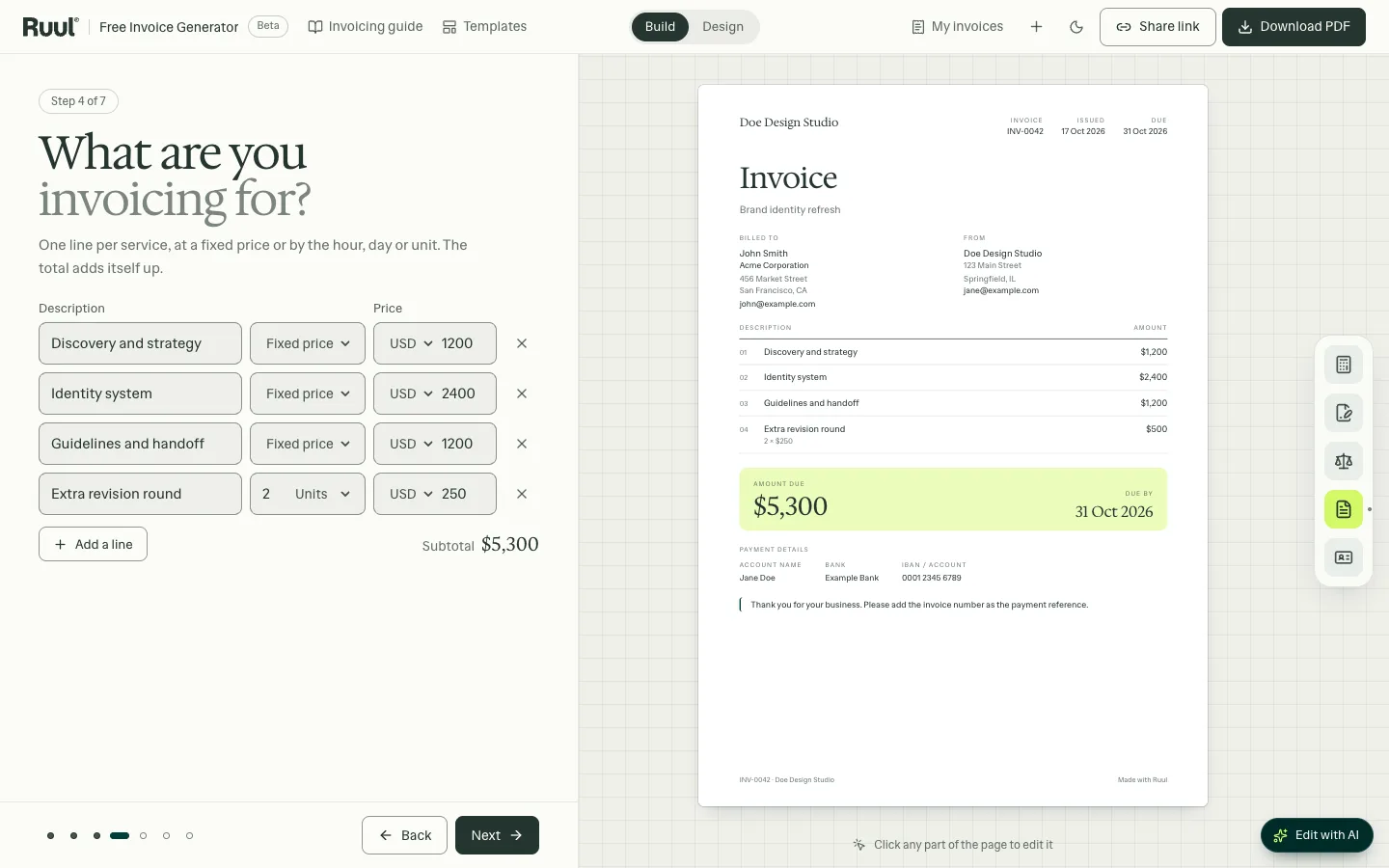 The Items step: each line goes onto the invoice as you type, and the total adds itself up.
 Then send it: download the PDF and attach it to an email, or share a live link your client can open in any browser.
Payment terms: what net 30 and due on receipt mean
Payment terms say how long your client has to pay: net 30 means within 30 days of the invoice date, and due on receipt means as soon as it arrives. Put the due date on the invoice as a date too.
Payment terms freelancers use, and when they fit | | What it means | When it fits |
| Due on receipt | Pay as soon as it arrives | Small jobs and new clients |
| Net 14 | Pay within 14 days of the invoice date | A good default for freelance work |
| Net 30 | Pay within 30 days | Larger companies that pay in monthly runs |
| Net 60 | Pay within 60 days | Only if a large client asks; agree it up front |
| 2/10 net 30 | 2% off if paid within 10 days, otherwise within 30 | If early payment is worth the discount; say so in the note |
Terms matter: according to Ruul's Freelance Economy Report 2026, which brings together more than 25 sources, 85% of freelancers have invoices paid late. Agree any late fee before the work starts, and put it in the note. In the UK, GOV.UK says a customer must pay within 30 days unless you've agreed a date, and that you can charge interest on late payments.
With Ruul you can also invoice clients in 190 countries, let them pay by card or bank transfer and get paid within 1 business day after they pay.
Invoice, receipt, quote or proforma invoice?
A quote and a proforma invoice come before the work, an invoice asks for payment once it's done, and a receipt confirms the payment. Your client may call your invoice a bill: it's the same document, from the side that pays it.
A quote, a purchase order, a proforma invoice, an invoice and a receipt compared | | When | What it does |
| Quote | Before the work | Says what the work will cost |
| Purchase order | Before the work, from your client | Approves the spend; its number goes on your invoice |
| Proforma invoice | Before the work or a delivery | Previews the invoice, so your client can approve it or pay in advance |
| Invoice | After the work, or at agreed points | Asks for payment |
| Receipt | After the payment | Confirms the invoice is paid |
Invoicing with or without a company
With a registered company, or as a freelancer who can invoice in their own name, you issue the invoice yourself. Without one, Ruul can: Ruul becomes the legal counterparty on the invoice, so you can invoice clients without a registered company.
Invoicing with and without a company compared | | With a company | Without a company, through Ruul |
| Who issues the invoice | You | Ruul, as the legal counterparty |
| Who your client pays | You, to your bank account | Ruul |
| Your tax ID | On the invoice | Not needed on the invoice |
| When you get paid | When your client's transfer arrives | Within 1 business day after your client pays |
For ongoing work, Ruul's subscription invoicing sends the same invoice on a schedule, and with every invoice and payout in one place, you're ready for tax time.
How to email an invoice
Send a short email with the invoice number, what it's for, the amount and the due date, and the invoice itself as a PDF or a link, so your client can pay without writing back. For example:
- Subject: Invoice INV-0042 from Doe Design Studio
- Message: Hi John, here's invoice INV-0042 for Brand identity refresh: $5,300, due by 31 Oct 2026. You can view it, download the PDF and see how to pay here: (link). Thank you, Doe Design Studio
The generator writes this email for you: on the last step, open Share link and choose Email it to your client.
How to ask a client to pay an overdue invoice
Reply to the invoice email with a short, friendly reminder: the invoice number, the amount, the date it was due and the link again. For example:
- Subject: Reminder: Invoice INV-0042 from Doe Design Studio
- Message: Hi John, a quick reminder that invoice INV-0042 for $5,300 was due on 31 Oct 2026. You can view it, download the PDF and see how to pay here: (link). If you've already paid, please ignore this reminder. Thank you, Doe Design Studio
Send it a few days after the due date. The generator writes it too: in My invoices, choose Send a reminder on the invoice. Or let Ruul send reminders for you.
Free invoice templates for Word, Excel, Google Docs and PDF
The generator's eight designs also come as free invoice templates, from Templates at the top of this page: Word files to fill in, Excel sheets that add up the totals as you type, and fillable PDFs in US Letter and A4. For Google Docs and Google Sheets, upload the Word or Excel file to Google Drive and open it there.
Three have a page of their own: contractor, consulting and photography invoice templates.
Questions freelancers ask about invoices
What is an invoice?
A document you send a client to ask for payment for work you've done: what you did, what it costs, when it's due and how to pay.
Is this invoice generator free?
Yes. Make as many invoices as you like, as PDFs or live links, with no account to create.
What happens to my invoice data?
Your invoices are saved in your browser, in My invoices, not on our servers.
Can I invoice a client without a registered company?
Yes, through Ruul: Ruul becomes the legal counterparty on the invoice, and you receive your payout within 1 business day after your client pays.
What is an invoice number?
A unique number that identifies the invoice. Use one unbroken sequence, like INV-0001, INV-0002, and never reuse a number; the builder counts up for you.
What does net 30 mean on an invoice?
Your client has 30 days from the invoice date to pay. Net 15 and net 60 work the same way; due on receipt means right away.
What's the difference between an invoice and a receipt?
An invoice asks for payment; a receipt confirms it, once you've been paid.
What is a proforma invoice?
A preview of an invoice, sent before the work is done or delivered, so your client can approve the spend or pay in advance. The invoice itself follows the work.
What is an itemized invoice?
One that lists each service on its own line with its price, instead of a single total. Every invoice from this builder is itemized.
Do I have to add tax?
It depends on where you and your client are, and on whether you're registered for tax; if you're not sure, ask an accountant. Leave the tax empty and the invoice shows none.
How long should I keep invoices?
As long as your tax authority can ask about them. In the US, the IRS generally says three years, longer in some cases; other countries set their own periods. My invoices keeps yours in this browser only, so keep the PDFs.
Does my client need an account to open the link?
No. They open it in any browser, download the PDF and copy your payment details.
What should I write in an invoice email?
The invoice number, what it's for, the amount and the due date, with the invoice as a PDF or a link. A few lines are enough: the invoice has the details.
