

Free Contractor Invoice Template
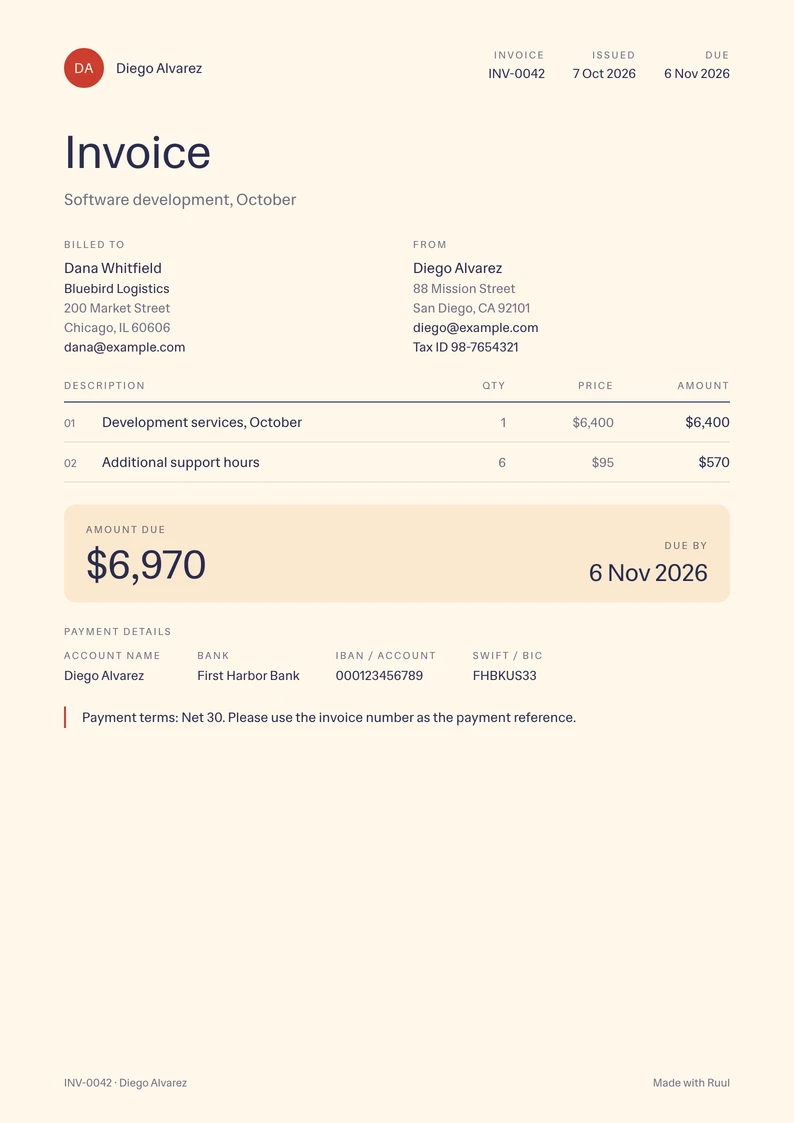
An invoice template for contractors: a monthly fee or hours, your tax ID and your payment terms on one page.
- Free
- No sign-up
- Word, Excel and PDF
-
Word .docx
Download -
Excel .xlsx with formulas
Download -
PDF US Letter, fillable
Download -
PDF A4, fillable
Download
The free invoice generator adds up the totals and gives you a PDF or a live link to send.
What to include on a contractor invoice
-
Your details Your name or business name, address and email. Add your tax ID if your client asks for it.
-
Your client's details Your client's name, company, address and email.
-
Invoice number and dates A number you haven't used before, the invoice date and the due date.
-
The period of the work The month or the dates the invoice covers, so it matches your contract.
-
Your fee A monthly fee, or your hours times your hourly rate, one line each.
-
Payment terms When the invoice is due, like Net 30: 30 days after the invoice date.
-
How to pay you Your bank details or a payment link, so your client can pay without asking.
How to make a contractor invoice
-
Download the template for Word, Excel or PDF, or fill it in online.
-
Fill in your details and your client's, the invoice number, the invoice date and your payment terms.
-
Describe the work for the period on the first line, like "Development services, October".
-
Add extra hours or other work below it, each with a quantity and a price.
-
Check the amount due and your payment details, save the invoice as a PDF and send it to your client.
Questions
Is there a special invoice for 1099 work?
No, a regular invoice like this one works. Your client may ask you for a Form W-9 when you start, and report what they paid you on Form 1099-NEC after the year ends. Keep a copy of every invoice you send to stay ready for tax time.
Should I put my Social Security number on an invoice?
You don't have to. If your client needs a tax ID, an EIN can take its place: the IRS issues one for free, and it keeps your Social Security number off the paperwork you send.
When should I send a contractor invoice?
When your contract says: often at the end of each month, or when you finish a milestone. Send it on the same day each month, so your client knows when to expect it.
Can I invoice a client without a registered company?
Yes. Ruul becomes the legal counterparty on the invoice, so you can invoice clients in 190 countries without a company of your own.
How do I get paid for an invoice?
Put your bank details in the template's payment section, or let your client pay online by card or bank transfer and get paid through Ruul: you receive your payout within 1 business day after your client pays.
More invoice templates
- Word invoice templates All eight designs as editable .docx files.
- Excel invoice templates All eight designs, with formulas that do the math.
- PDF invoice templates All eight designs as fillable PDFs, in US Letter and A4.
- Consulting invoice template For retainers, sessions and expenses, with the period they cover.
- Photography invoice template Session, edited images and usage rights on one page.