

If you bill the same client on a regular basis - a monthly retainer, an ongoing project, or any recurring work - you can set up a scheduled invoice instead of creating a new one every time. Ruul generates and sends the invoice automatically on the date you choose each month.
Important: A scheduled invoice is not a subscription. Ruul creates and sends a fresh invoice each cycle, but your client still pays each invoice manually. There is no automatic charge on their payment method.
How to create a scheduled invoice
You create a scheduled invoice exactly the same way as a one-time invoice. If you haven’t created an invoice before, start with how to create a one-time invoice.
In Step 4 (Payment Schedule & Details), instead of “Once Only”, choose “Automatically generate this invoice on…” and select the day of the month you want the invoice to be sent.
Once saved, Ruul will automatically generate and send the invoice to your client on that date each month.
Managing your scheduled invoices
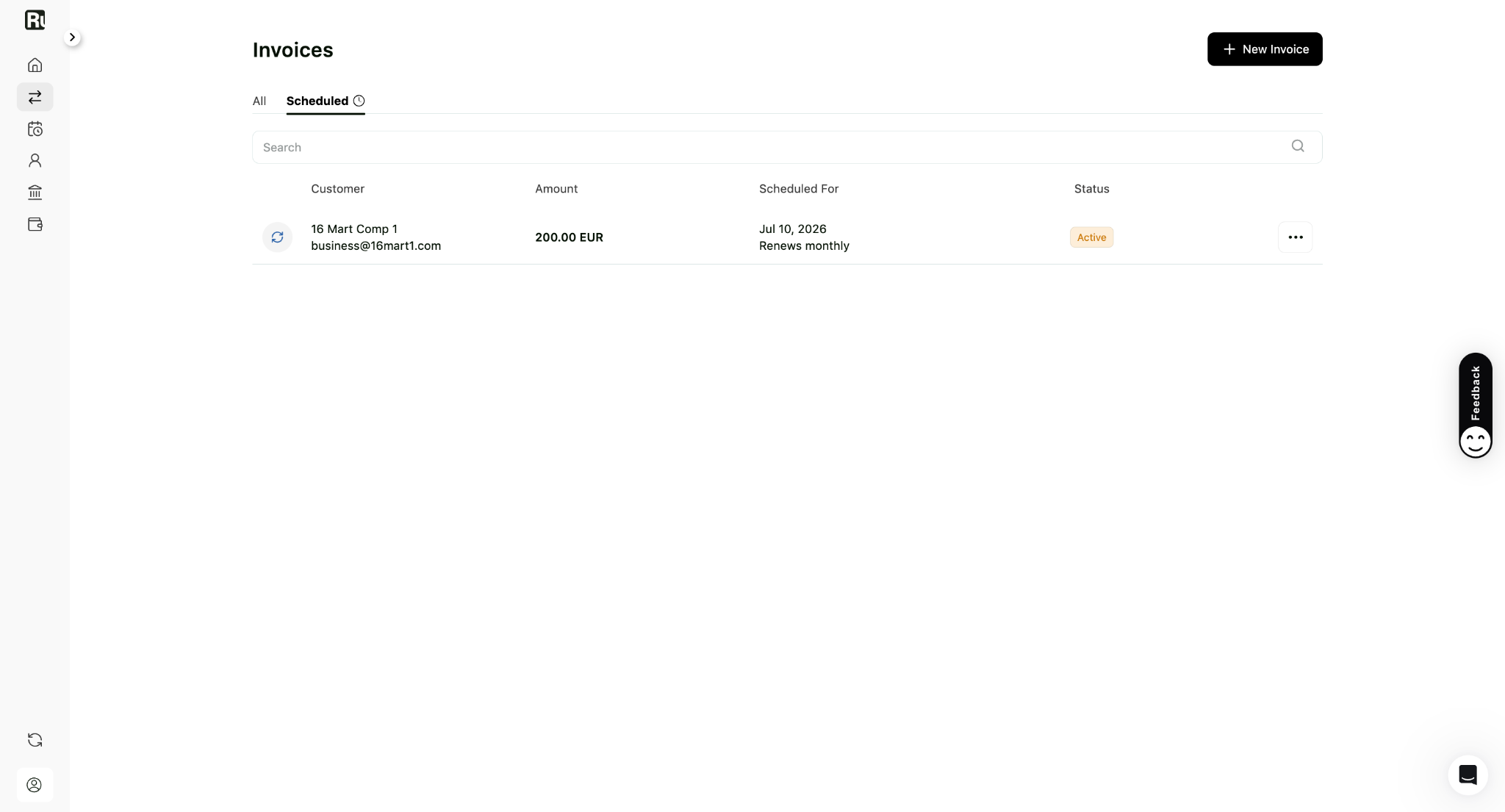
Scheduled invoices appear under the Scheduled tab in your Invoices. There you can see each one’s:
- Customer and amount
- The day of the month it is sent (e.g. Generates on the 5th of every month)
- Status (Active or Inactive)
Available actions (More menu – •••):
- Stop Recurring Invoice: Cancels the schedule. The invoice will no longer be generated automatically.
Scheduled invoices keep running until you stop them. If you need to change the amount or other details, stop the current schedule and create a new one with the updated information.
Good to know
- Each generated invoice is sent to your client exactly like a one-time invoice - they receive a payment link by email and pay it manually.
- Your client’s payment and your payout follow the same flow as any other invoice.
- Stopping a scheduled invoice does not cancel any already-issued invoices - those remain open for payment.
Frequently asked questions
What is the difference between a one-time invoice and a scheduled invoice?
A one-time invoice is sent once. A scheduled invoice is generated automatically on the same date each month - your client receives a fresh invoice each cycle and pays it as normal.
Does my client get charged automatically?
No. Ruul generates and sends the invoice automatically, but your client pays each invoice manually - by bank transfer or card. There is no automatic charge on their card.
How do I stop a scheduled invoice?
Go to the Scheduled tab in your Invoices, open the More (•••) menu on the invoice, and choose Stop Recurring Invoice. Once stopped, no further invoices are generated.
Can I set up a scheduled invoice for any client?
Yes, for any client you bill on a regular basis - a monthly retainer, an ongoing service, or any recurring work.
Was this article helpful?
Thanks for the feedback! 🙌